 Tentacle ServerMicrosoft Store appApp du Microsoft Store
Tentacle Server for WindowsTentacle Server pour Windows
One app from the Microsoft Store, no Docker, no terminal. It lives next to the clock, starts with Windows and updates itself. You only need Jellyfin, which the wizard can install for you.Une app du Microsoft Store, sans Docker ni terminal. Elle vit près de l’horloge, démarre avec Windows et se met à jour toute seule. Il ne vous faut que Jellyfin, que l’assistant peut installer pour vous.
What it isCe que c’est
Tentacle Server runs the Tentacle server on a Windows PC, without Docker. It is the same server as the Docker image — same setup wizard, same administration, same apps on your phones and TVs — in an app that sits in the notification area, starts when you sign in to Windows and is updated by the Microsoft Store.Tentacle Server fait tourner le serveur Tentacle sur un PC Windows, sans Docker. C’est le même serveur que l’image Docker — même assistant d’installation, même administration, mêmes applications sur vos téléphones et vos TV — dans une app qui se loge dans la zone de notification, démarre à l’ouverture de votre session Windows et se met à jour par le Microsoft Store.
It works with Jellyfin, the free media server that reads your video files: on the same PC or elsewhere on your network. The wizard finds it, or offers to install it from jellyfin.org with your agreement.Il fonctionne avec Jellyfin, le serveur multimédia gratuit qui lit vos fichiers vidéo : sur le même PC ou ailleurs sur votre réseau. L’assistant le trouve, ou propose de l’installer depuis jellyfin.org avec votre accord.
Tentacle Server is not affiliated with the Jellyfin project. Jellyfin is a trademark of Jellyfin, Inc.Tentacle Server n’est pas affilié au projet Jellyfin. Jellyfin est une marque de Jellyfin, Inc.
What you needCe qu’il faut
| Windows | Windows 10 version 2004 (build 19041) or later, or Windows 11 — on a 64-bit Intel or AMD PC (x64).Windows 10 version 2004 (build 19041) ou plus récent, ou Windows 11 — sur un PC Intel ou AMD 64 bits (x64). |
|---|---|
| Jellyfin | On this PC or on your network. None yet? The wizard offers to install it from jellyfin.org.Sur ce PC ou sur votre réseau. Pas encore ? L’assistant propose de l’installer depuis jellyfin.org. |
| AccountCompte | Any Windows account: Tentacle itself needs no administrator rights.N’importe quel compte Windows : Tentacle lui-même n’exige aucun droit d’administrateur. |
| NetworkRéseau | The PC’s network set to Private (see Firewall and network).Le réseau du PC en Privé (voir Pare-feu et réseau). |
| DiskDisque | About 150 MB for the app. Your movies stay where they are.Environ 150 Mo pour l’app. Vos films restent où ils sont. |
Install the appInstaller l’app
- Open the Microsoft Store, search for Tentacle Server, click Get.Ouvrez le Microsoft Store, cherchez Tentacle Server, cliquez sur Obtenir.
- Click Open (or open Tentacle Server from the Start menu).Cliquez sur Ouvrir (ou ouvrez Tentacle Server depuis le menu Démarrer).
From a terminal, the same thing in one line:Depuis un terminal, la même chose en une ligne :
winget install --source msstore "Tentacle Server"First launchPremier lancement
- A startup screen appears: the logo, the current step (Starting the server, Preparing the database…) and a progress bar. The first start can take a minute.Un écran de démarrage paraît : le logo, l’étape en cours (Démarrage du serveur, Préparation de la base de données…) et une barre de progression. Le premier démarrage peut prendre une minute.
- It asks once: “Start Tentacle Server when Windows starts?” Answer Yes for a server that is always there. You can change it later (Start with Windows).Il demande une fois : « Lancer Tentacle Server au démarrage de Windows ? » Répondez Oui pour un serveur toujours là. Vous pourrez changer d’avis (Démarrer avec Windows).
- The Tentacle icon appears next to the clock — maybe under the ^ arrow: drag it onto the taskbar to keep it in sight.L’icône de Tentacle paraît près de l’horloge — peut-être sous la flèche ^ : faites-la glisser sur la barre des tâches pour la garder en vue.
- Your browser opens the setup wizard, on this PC’s network address (for example
http://192.168.1.20:3000). From this PC, no code is asked: answer its questions.Votre navigateur ouvre l’assistant d’installation, sur l’adresse réseau de ce PC (par exemplehttp://192.168.1.20:3000). Depuis ce PC, aucun code n’est demandé : répondez à ses questions.
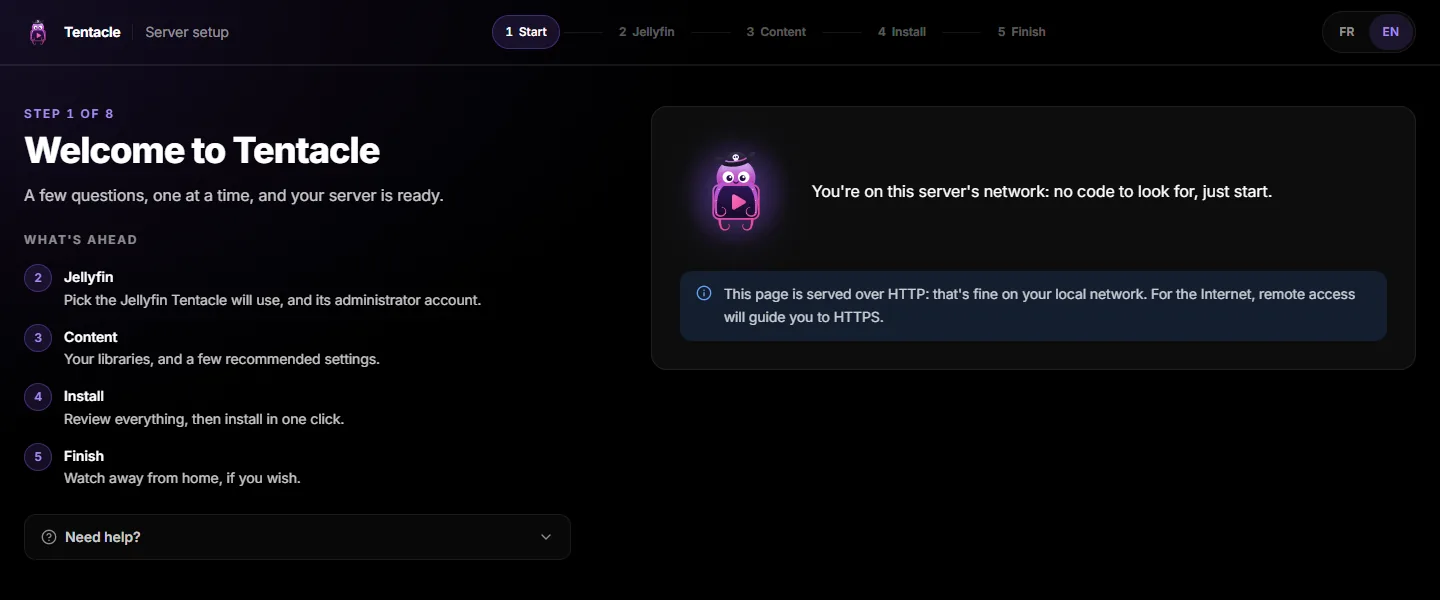
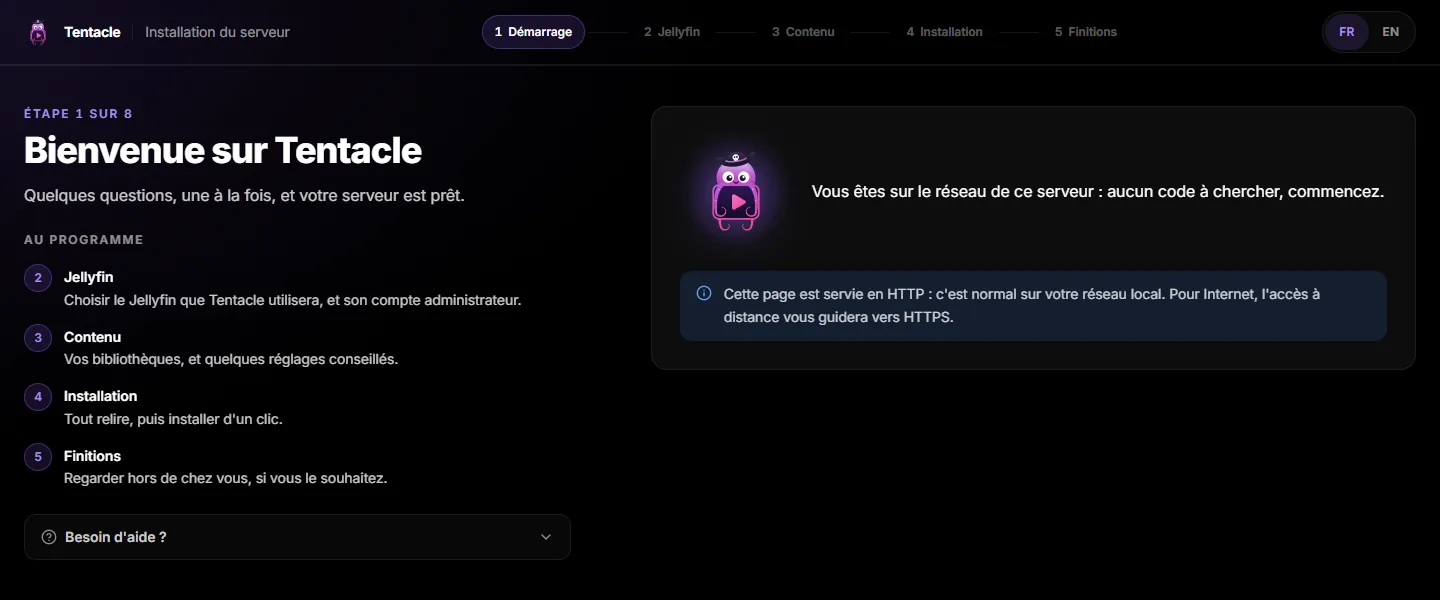
If the server could not start, the startup screen says why, with Try again and Open log. Closing it with its cross does not stop the server: the icon takes over.Si le serveur n’a pas pu démarrer, l’écran de démarrage dit pourquoi, avec Réessayer et Ouvrir le journal. Le fermer à la croix n’arrête pas le serveur : l’icône prend le relais.
The setup wizardL’assistant d’installation
The same wizard as with Docker, one question per screen: Jellyfin, your account, your libraries, the recommended settings, then a review before installing. Each screen has its own page in this documentation; here is only what changes on Windows.Le même assistant qu’avec Docker, une question par écran : Jellyfin, votre compte, vos bibliothèques, les réglages conseillés, puis un récapitulatif avant d’installer. Chaque écran a sa page dans cette documentation ; voici seulement ce qui change sous Windows.
JellyfinJellyfin
- Already have Jellyfin? The wizard finds it, on this PC or on your network. Just pick it (Choose the Jellyfin server). Installed but stopped: Start Jellyfin launches it.Vous avez déjà Jellyfin ? L’assistant le trouve, sur ce PC ou sur votre réseau. Choisissez-le (Choisir le serveur Jellyfin). Installé mais arrêté : Démarrer Jellyfin le lance.
- No Jellyfin yet? Click Download and install Jellyfin. Tentacle downloads the official installer from jellyfin.org, checks it, and opens it once you agree. Windows asks for your approval: that is Jellyfin’s installer, not Tentacle.Pas encore de Jellyfin ? Cliquez sur Télécharger et installer Jellyfin. Tentacle télécharge l’installateur officiel depuis jellyfin.org, le vérifie et l’ouvre avec votre accord. Windows demande votre accord : c’est l’installateur de Jellyfin, pas Tentacle.
- In the installer, choose the Basic Install, not the service: Jellyfin then starts with your Windows session and sees your network drives.Dans l’installateur, choisissez l’Installation simple (Basic Install), pas le service : Jellyfin démarre alors avec votre session Windows et voit vos lecteurs réseau.
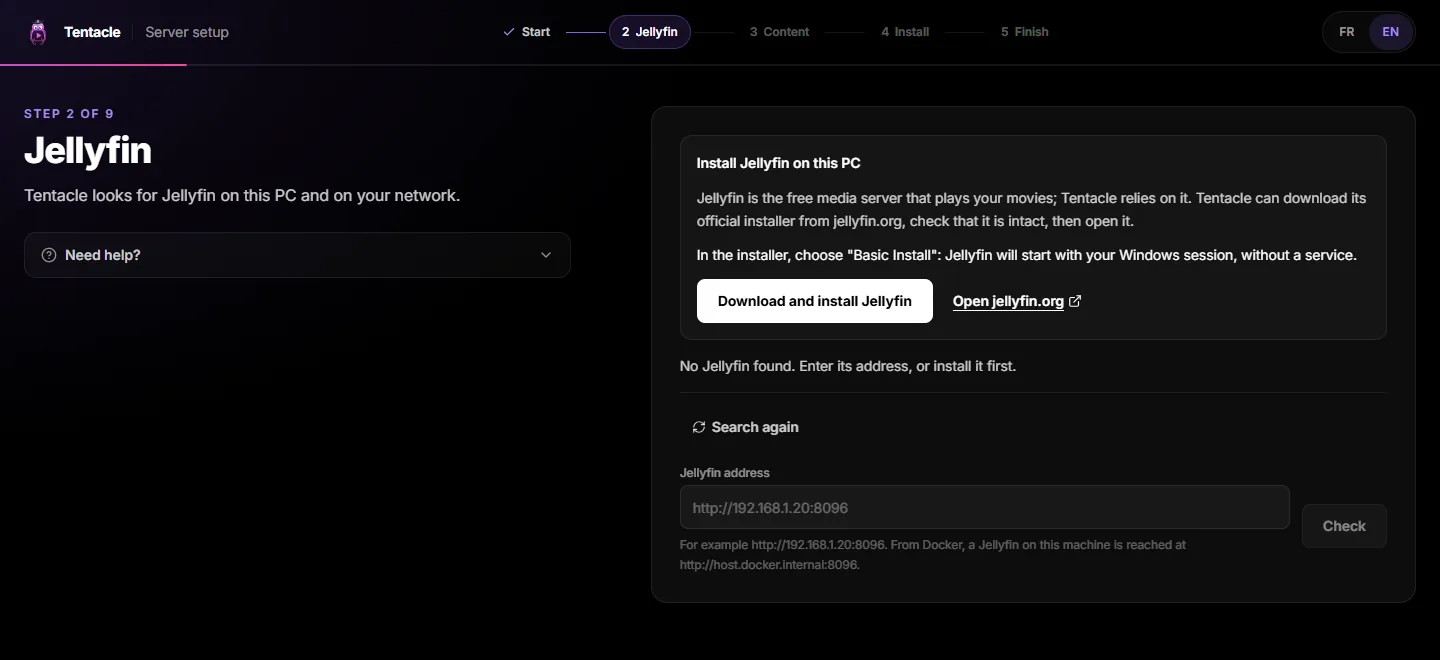
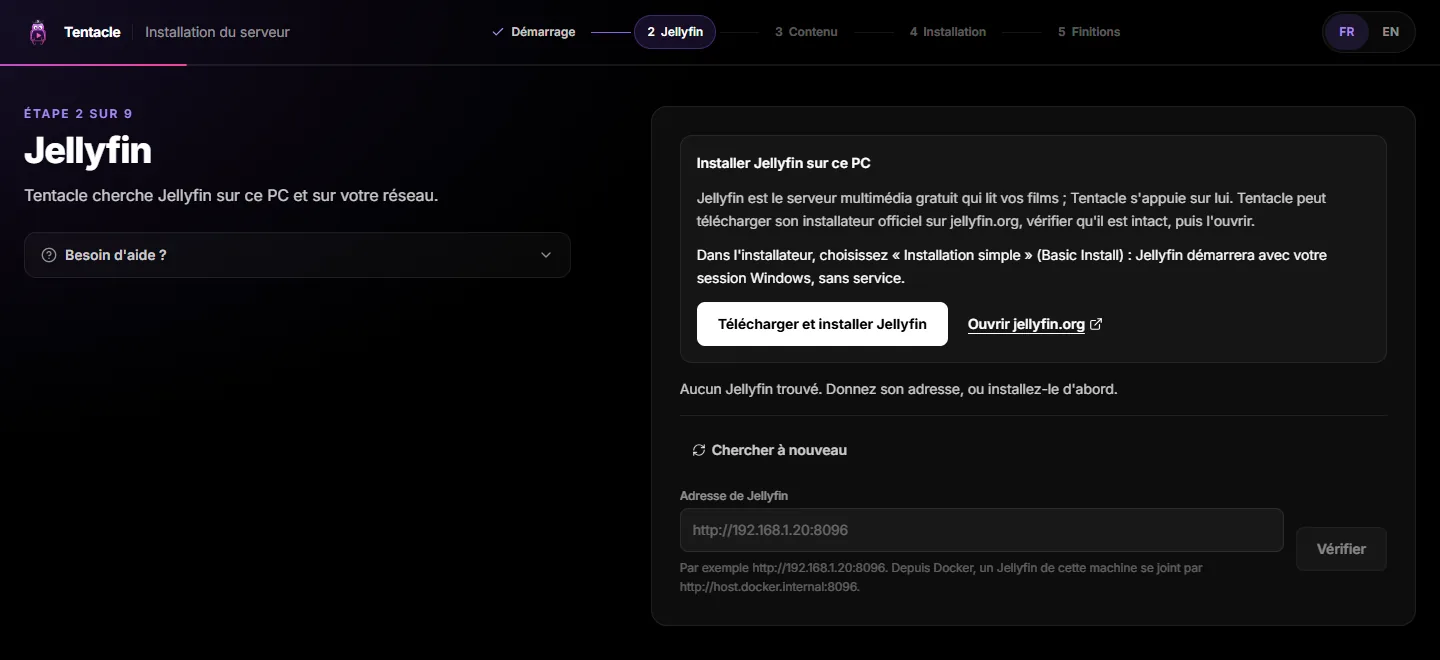
The wizard follows the installation in three steps — download, installer on screen, start. When the installer closes, Tentacle starts Jellyfin and finds it by itself. Closed too early? Try again.L’assistant suit l’installation en trois étapes — téléchargement, installateur à l’écran, démarrage. Quand l’installateur se ferme, Tentacle démarre Jellyfin et le trouve tout seul. Fermé trop tôt ? Réessayer.
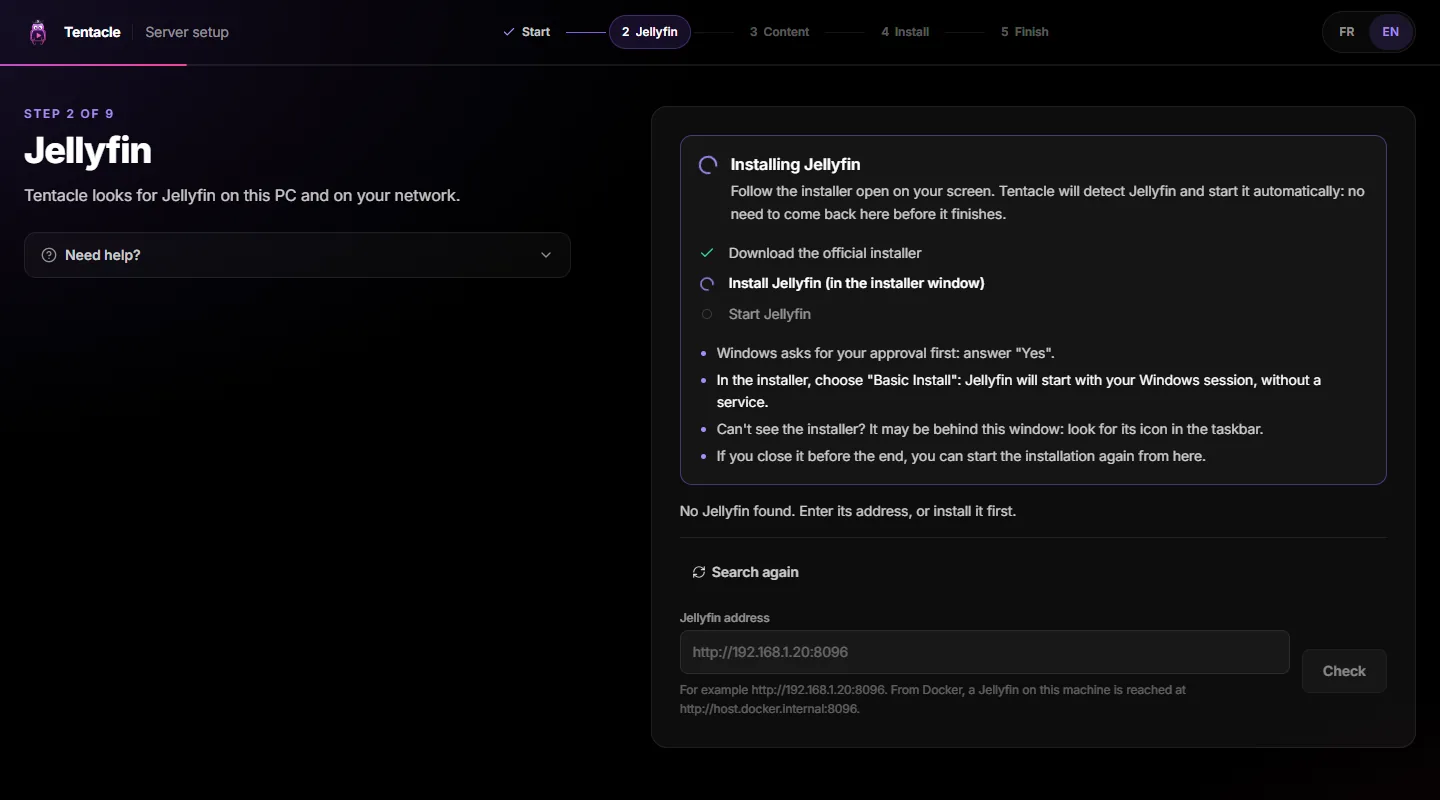
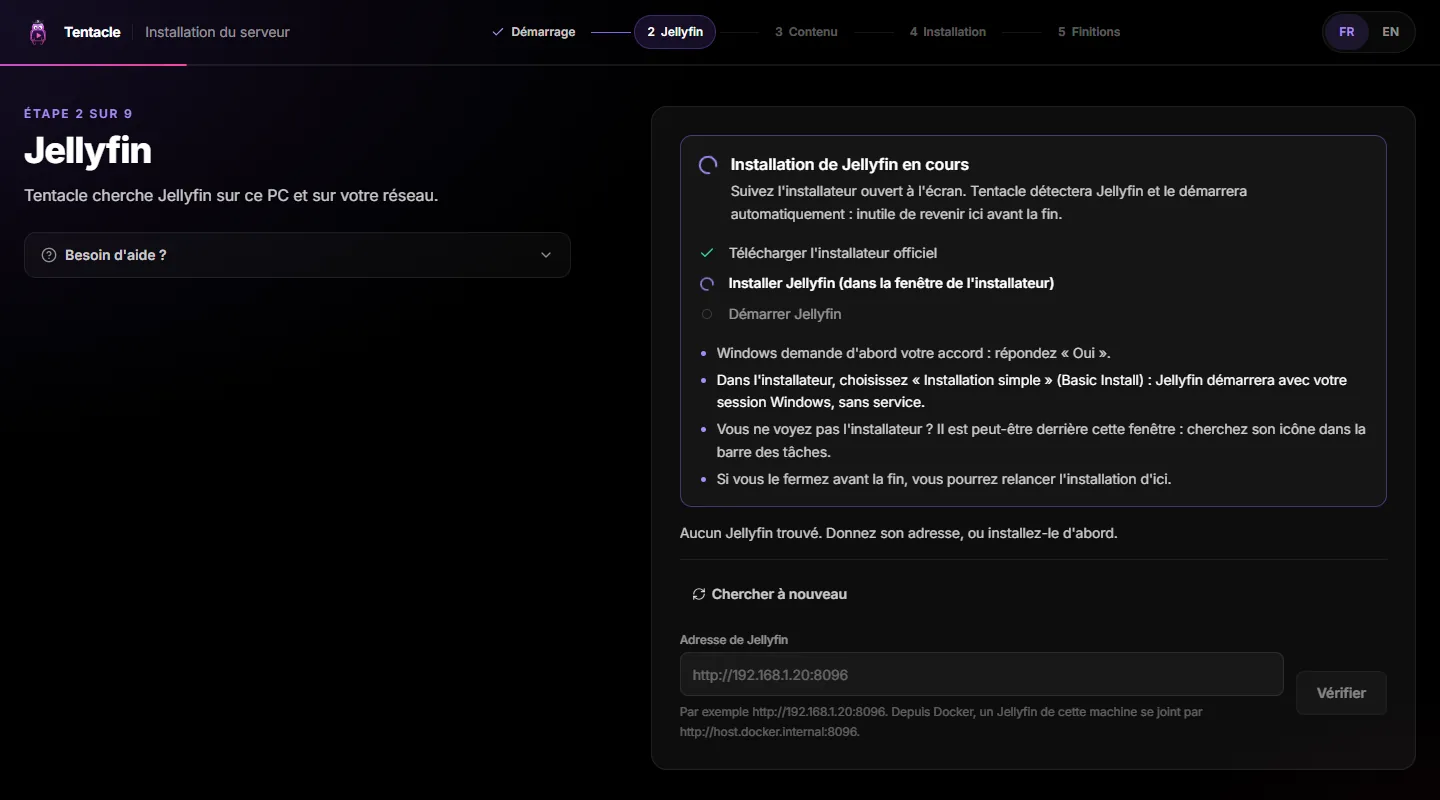
If the download or the launch fails (Smart App Control can block Jellyfin’s installer), the wizard opens jellyfin.org: install Jellyfin from there, then come back — the wizard detects it as soon as it answers. Tentacle never updates, stops or uninstalls Jellyfin.Si le téléchargement ou le lancement échoue (le contrôle intelligent des applications peut bloquer l’installateur de Jellyfin), l’assistant ouvre jellyfin.org : installez Jellyfin de là, puis revenez — l’assistant le détecte dès qu’il répond. Tentacle ne met jamais Jellyfin à jour, ne l’arrête pas et ne le désinstalle pas.
Your accountVotre compte
For a new Jellyfin, you create its administrator; for one already set up, you sign in with it. Nothing specific to Windows: Account or sign-in.Pour un Jellyfin neuf, vous créez son administrateur ; pour un Jellyfin déjà configuré, vous vous connectez avec. Rien de propre à Windows : Compte ou connexion.
Your movie foldersVos dossiers de films
- Write folders as Jellyfin sees them:
D:\Movies,E:\Shows. On this PC, Browse with File Explorer opens Windows’ folder picker.Écrivez les dossiers tels que Jellyfin les voit :D:\Films,E:\Séries. Sur ce PC, Parcourir avec l’Explorateur ouvre le sélecteur de dossiers de Windows. - On a NAS, use the network path
\\NAS\share\Movies, not a drive letter likeZ:: Jellyfin does not see drive letters.Sur un NAS, utilisez le chemin réseau\\NAS\partage\Films, pas une lettre commeZ:: Jellyfin ne voit pas les lettres de lecteur. - A USB disk? Give it a fixed letter in Disk Management, or the library may go empty when the letter changes.Un disque USB ? Donnez-lui une lettre fixe dans la Gestion des disques, sinon la bibliothèque peut se vider quand la lettre change.
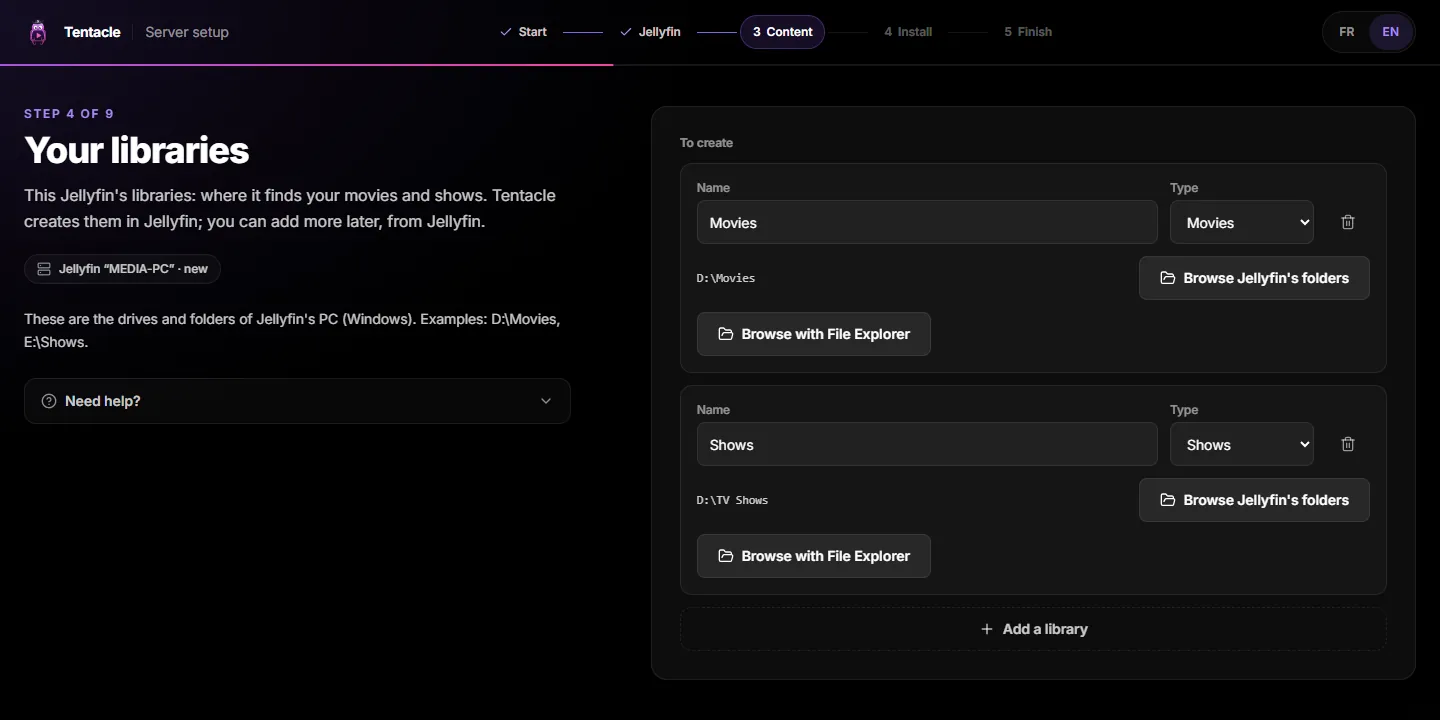
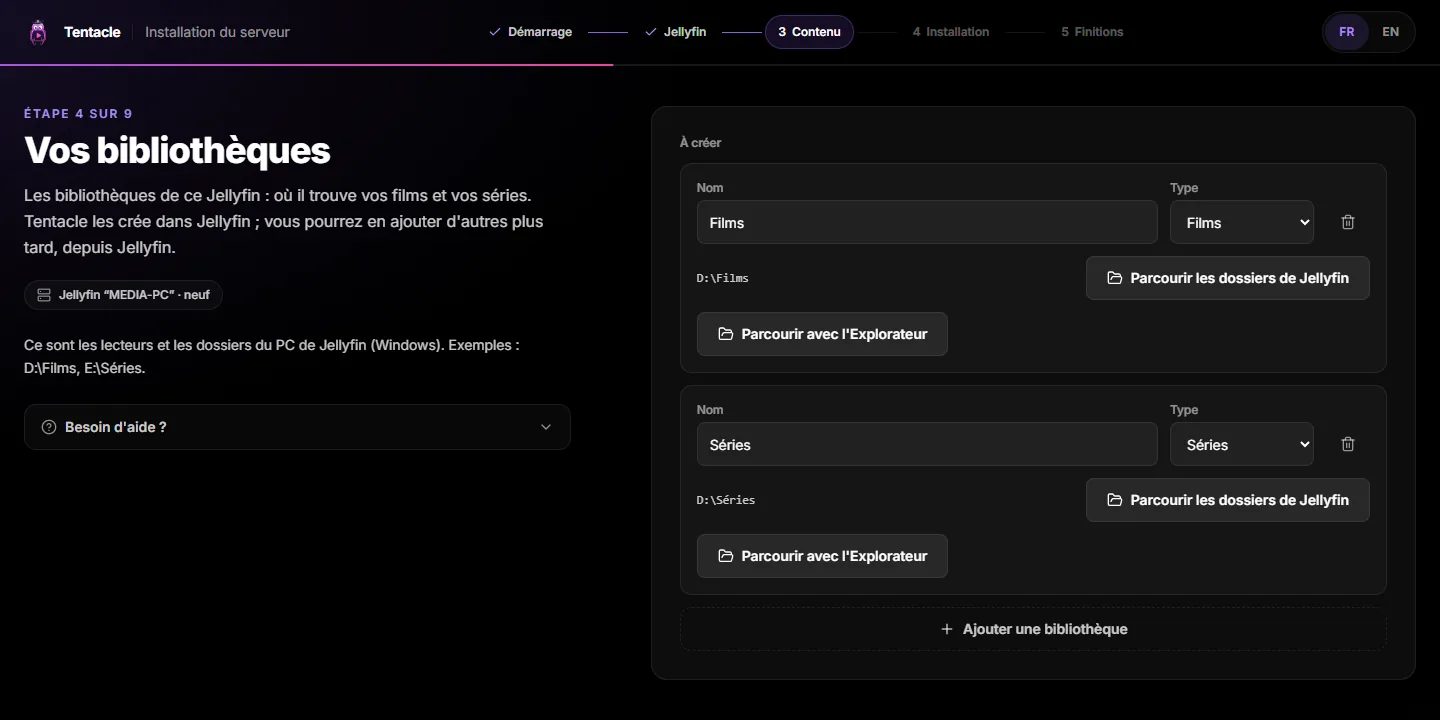
More on libraries: Libraries. Then come the recommended settings and the review, as everywhere.Tout sur les bibliothèques : Bibliothèques. Viennent ensuite les réglages conseillés et le récapitulatif, comme partout.
Start with WindowsDémarrer avec Windows
Turned on, Tentacle starts each time you sign in to Windows, without opening anything. Turn it off or on with Start with Windows in the icon’s menu, or in Settings › Apps › Startup. Turned off in Settings, it can only be turned back on there.Activé, Tentacle démarre à chaque ouverture de votre session Windows, sans rien ouvrir. Coupez-le ou rallumez-le par Démarrer avec Windows dans le menu de l’icône, ou dans Paramètres › Applications › Démarrage. Coupé dans les Paramètres, il ne se rallume que là.
- After a Windows update, the PC restarts and waits at the sign-in screen. Turn on Settings › Accounts › Sign-in options › “Use my sign-in info to automatically finish setting up after an update”.Après une mise à jour de Windows, le PC redémarre et attend sur l’écran de connexion. Activez Paramètres › Comptes › Options de connexion › « Utiliser mes informations de connexion pour terminer automatiquement la configuration après une mise à jour ».
- A PC that only serves Tentacle? Let Windows sign in by itself with Microsoft’s Autologon tool — only on a machine kept in a safe place, with an account used for nothing else.Un PC qui ne sert qu’à Tentacle ? Faites ouvrir la session par Windows avec l’outil Autologon de Microsoft — seulement sur une machine en lieu sûr, avec un compte qui ne sert qu’à ça.
- Never let the PC sleep: Settings › System › Power › Screen and sleep, “When plugged in, put my device to sleep after”: Never. A sleeping PC answers no TV.Ne laissez jamais le PC se mettre en veille : Paramètres › Système › Alimentation › Écran et veille, « Lorsque branché, mettre l’appareil en veille après » : Jamais. Un PC en veille ne répond à aucune TV.
Firewall and networkPare-feu et réseau
Nothing to open: the app brings its own firewall rule, for private (home) networks only. No prompt, and a port changed later stays open. Public networks stay closed on purpose: Tentacle never shows itself on a café’s Wi-Fi.Rien à ouvrir : l’app apporte sa propre règle de pare-feu, pour les réseaux privés (domestiques) seulement. Aucune invite, et un port changé plus tard reste ouvert. Les réseaux publics restent fermés, exprès : Tentacle ne se montre jamais sur le Wi-Fi d’un café.
- Jellyfin’s own firewall: installed in the basic mode, Jellyfin asks once which networks to allow — tick Private.Le pare-feu de Jellyfin : installé en mode simple, Jellyfin demande une fois quels réseaux autoriser — cochez Privé.
- Give the PC a fixed address in your router (DHCP reservation): your TVs, and the router’s port forwarding, always find it.Donnez une adresse fixe au PC dans votre box (réservation DHCP) : vos TV, et la redirection de port de la box, le retrouvent toujours.
Port 3000 already takenPort 3000 déjà pris
Tentacle listens on port 3000. If another program uses it, the icon says so: icon › Change port, pick a free port, and Tentacle restarts on it. Devices already paired must be paired again, and a port forwarding must follow — so choose the port before pairing your devices.Tentacle écoute sur le port 3000. Si un autre programme le prend, l’icône le dit : icône › Changer de port, choisissez un port libre, et Tentacle redémarre dessus. Les appareils déjà jumelés doivent l’être à nouveau, et une redirection de port doit suivre — choisissez donc le port avant de jumeler vos appareils.
UpdatesMises à jour
Nothing to do. The Microsoft Store updates the app, server included. Since the Store never updates an app while it runs, Tentacle installs its updates itself, at a quiet moment when nobody is watching anything — after saving a copy of its database.Rien à faire. Le Microsoft Store met l’app à jour, serveur compris. Comme le Store ne met jamais à jour une app qui tourne, Tentacle installe lui-même ses mises à jour, à un moment calme où personne ne regarde rien — après avoir gardé une copie de sa base.
Administration › Overview says Updated by the Microsoft Store instead of a Docker command. An app says your server is too old? Open the Store’s Library and click Get updates.Administration › Vue d’ensemble dit Mise à jour par le Microsoft Store au lieu d’une commande Docker. Une application dit que votre serveur est trop ancien ? Ouvrez la Bibliothèque du Store et cliquez sur Obtenir les mises à jour.
Your dataVos données
Everything Tentacle keeps — its database, settings, accounts, logs — is in one folder:Tout ce que Tentacle garde — sa base, ses réglages, les comptes, les journaux — est dans un seul dossier :
C:\ProgramData\Tentacle ServerProgramDatais hidden: type%ProgramData%\Tentacle Serverin File Explorer’s address bar.ProgramDataest caché : tapez%ProgramData%\Tentacle Serverdans la barre d’adresse de l’Explorateur.- Uninstalling the app keeps it: reinstall, and your server is back as it was.Désinstaller l’app le garde : réinstallez, et votre serveur revient tel qu’il était.
- To erase it: icon › Delete server data… (confirmation asked). Tentacle deletes the folder, then quits. Jellyfin, its data and your movies are never touched.Pour l’effacer : icône › Supprimer les données du serveur… (confirmation demandée). Tentacle supprime le dossier, puis se ferme. Jellyfin, ses données et vos films ne sont jamais touchés.
- Back up: Quit Tentacle, copy the folder (or just
tentacle.db), then start it again from the Start menu. Keep the folder where it is: not on OneDrive, not on a network share.Sauvegarder : Quittez Tentacle, copiez le dossier (ou seulementtentacle.db), puis relancez-le depuis le menu Démarrer. Laissez le dossier où il est : ni sur OneDrive, ni sur un partage réseau.
Watch away from homeRegarder hors de chez soi
It works exactly as with Docker: the wizard’s remote-access screen tests your address from the outside, and the guide covers ports, HTTPS and CGNAT. On Windows, forward the router’s port to the PC’s fixed address — the app’s firewall rule already lets it in.C’est exactement comme avec Docker : l’écran d’accès à distance de l’assistant teste votre adresse depuis l’extérieur, et le guide couvre les ports, le HTTPS et le CGNAT. Sous Windows, redirigez le port de la box vers l’adresse fixe du PC — la règle de pare-feu de l’app le laisse déjà entrer.
TroubleshootingDépannage
| SymptomSymptôme | What to doQue faire |
|---|---|
| No icon after launchPas d’icône après le lancement | Look under the ^ arrow next to the clock.Regardez sous la flèche ^, près de l’horloge. |
| Port 3000 already in usePort 3000 déjà utilisé | Change port, or close the program that holds it.Changer de port, ou fermez le programme qui le tient. |
| The server keeps stoppingLe serveur s’arrête sans cesse | Open log, read the last lines, then Restart server.Ouvrir le journal, lisez les dernières lignes, puis Redémarrer le serveur. |
| Phones and TVs don’t find the serverTéléphones et TV ne trouvent pas le serveur | Network set to Public? A VPN on the PC? Use the address opened by Open administration.Réseau en Public ? Un VPN sur le PC ? Utilisez l’adresse qu’ouvre Ouvrir l’administration. |
| Data held by another serverDonnées tenues par un autre serveur | Another Tentacle (or another Windows account) uses the folder: close it, then Restart server.Un autre Tentacle (ou un autre compte Windows) utilise le dossier : fermez-le, puis Redémarrer le serveur. |
| Jellyfin’s installer is blockedL’installateur de Jellyfin est bloqué | Install Jellyfin from jellyfin.org, then Search again in the wizard.Installez Jellyfin depuis jellyfin.org, puis Chercher à nouveau dans l’assistant. |
The log is one file per day, kept seven days, in C:\ProgramData\Tentacle Server\logs — attach it when you ask for help. For the rare cases the menu does not cover, the app adds a tentacle command to Windows, the same as in the Docker image:Le journal, c’est un fichier par jour, gardé sept jours, dans C:\ProgramData\Tentacle Server\logs — joignez-le quand vous demandez de l’aide. Pour les rares cas que le menu ne couvre pas, l’app ajoute à Windows une commande tentacle, la même que dans l’image Docker :
tentacle setup token
tentacle setup reset
The first gives a new setup code, the second reopens the wizard. Everything else: Troubleshooting.La première donne un nouveau code d’installation, la seconde rouvre l’assistant. Tout le reste : Dépannage.
Questions you might haveLes questions qu’on se pose
Do I still need Docker?Faut-il encore Docker ?
No. On a Windows PC, the app replaces it. The Docker stacks remain the way for a NAS or a Linux machine: Install the server.
Non. Sur un PC Windows, l’app le remplace. Les piles Docker restent la voie pour un NAS ou une machine Linux : Installer le serveur.
I already run Tentacle in Docker Desktop. Can I switch?Tentacle tourne déjà dans Docker Desktop. Puis-je passer à l’app ?
Yes, but not both at once: both use port 3000. Stop the Docker stack first. The app is a new server, set up by its own wizard: your Jellyfin, its libraries and your movies stay as they are; your devices are paired again with the new server.
Oui, mais pas les deux à la fois : tous deux utilisent le port 3000. Arrêtez d’abord la pile Docker. L’app est un nouveau serveur, réglé par son propre assistant : votre Jellyfin, ses bibliothèques et vos films restent tels quels ; vos appareils se jumellent à nouveau avec le nouveau serveur.
Does it work on Windows Server?Ça marche sur Windows Server ?
Windows Server has no Microsoft Store. On Windows Server 2025 with the desktop experience, the winget command may work, without any promise; nothing is promised for 2019, 2022 or Server Core. And since Tentacle starts at sign-in, a server needs automatic sign-in (above).
Windows Server n’a pas de Microsoft Store. Sur Windows Server 2025 avec l’expérience de bureau, la commande winget peut marcher, sans promesse ; rien n’est promis pour 2019, 2022 ni Server Core. Et Tentacle démarrant à l’ouverture de session, un serveur a besoin de l’ouverture de session automatique (plus haut).
And on an ARM PC?Et sur un PC ARM ?
The app is built for x64 only; running it under Windows’ x64 emulation is not tested. Jellyfin publishes no ARM installer, so the wizard always sends you to jellyfin.org.
L’app est faite pour x64 seulement ; la faire tourner sous l’émulation x64 de Windows n’est pas éprouvé. Jellyfin ne publie aucun installateur ARM : l’assistant renvoie toujours vers jellyfin.org.
Hardware transcoding?Le transcodage matériel ?
It is Jellyfin’s business: Jellyfin › Dashboard › Playback › Transcoding (Intel QSV, NVIDIA NVENC, AMD AMF). The Hardware transcoding page is for Docker.
C’est l’affaire de Jellyfin : Jellyfin › Tableau de bord › Lecture › Transcodage (Intel QSV, NVIDIA NVENC, AMD AMF). La page Transcodage matériel vaut pour Docker.
Skip intro and credits?Passer l’intro et le générique ?
Detection by the three Jellyfin plugins works. Tentacle’s own audio analysis is not offered in this first version of the app (Skip intro & credits).
La détection par les trois greffons de Jellyfin marche. L’analyse audio propre à Tentacle n’est pas proposée dans cette première version de l’app (Passer l’intro et le générique).
Is Tentacle Server part of Jellyfin?Tentacle Server fait-il partie de Jellyfin ?
No. Tentacle Server is a separate program that works with Jellyfin; it is not affiliated with the Jellyfin project. The installer it offers is Jellyfin’s official one, downloaded from jellyfin.org, unmodified.
Non. Tentacle Server est un programme distinct qui fonctionne avec Jellyfin ; il n’est pas affilié au projet Jellyfin. L’installateur qu’il propose est celui de Jellyfin, téléchargé depuis jellyfin.org, non modifié.